Separate product from Hub Studio

AI employees that work inside your company

Chat to brief them. An app to run the roster. Mail, routines and a real computer included while you have balance.

How it works

App to direct them. Chat to talk to them.

Real screenshot of Hub Bot Chat

The team chat. You brief each employee, follow the thread and pick up the files they leave.

With the computer

It logs into the tools you already use

No connector per product. The AI employee works on a real desktop: it opens the browser and signs in like a person. Holded, Salesforce, Gmail, Drive, Dropbox or whatever you already run.

  • Holded

  • Salesforce

  • Sage

  • Factorial

  • Odoo

  • HubSpot

  • Google

  • Gmail

  • Google Drive

  • Google Calendar

  • Google Sheets

  • Dropbox

  • Outlook

  • Microsoft Teams

  • Excel

  • OneDrive

  • WhatsApp

  • Slack

  • LinkedIn

  • Notion

  • Shopify

  • PrestaShop

  • WooCommerce

  • Stripe

  • PayPal

  • Zoom

  • Canva

  • Trello

  • Jira

  • Asana

  • Calendly

  • Brevo

  • Instagram

If it opens in a browser, the employee can use it. Not only the logos below.

What it can do

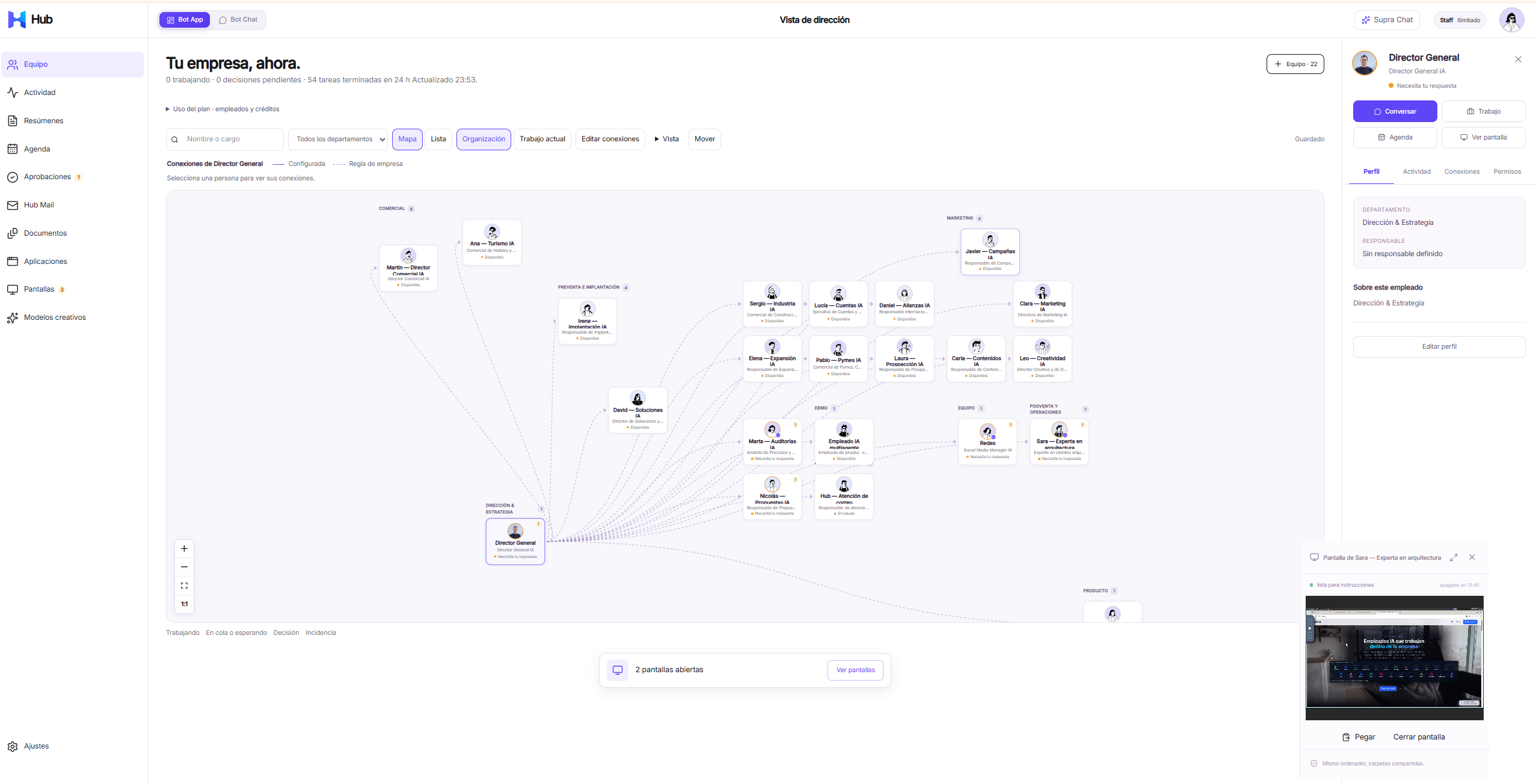
One space for people, work and the computer

Employees

3, 10 or 20 AI employees depending on the plan. Extra seats are not sold separately; usage is what you pay.

Approvals

A human authorises mail and anything you mark as ask-first before it leaves the company.

Computer

A persistent Daytona desktop with VNC. The employee opens Holded, Salesforce, Gmail or any other site in the browser. Included while credit balance is above zero.

Uses

Where a company actually puts AI employees

Leadership

Brief the Director, get a recap, keep a paper trail of who did what.

Operations

Routines, documents and a browser when the work lives in Holded, Drive or any other site.

Sales & admin

Draft mail, prepare files, keep approvals before anything leaves the company.

How you start

Register in Hub Bot

  1. 1

    Create a Hub Bot account

    Independent from Hub Studio. Same email is allowed; it is still another account.

  2. 2

    Get 200 welcome credits

    Once, on your first space. Top-ups never expire. Plan credits accumulate while the subscription is active.

  3. 3

    Work with the Director

    Your tenant is provisioned with a General Director and a Hub Developer. Hire more employees up to your plan.

Plans

Libre, Autónomos and Empresas

Credits buy usage. The plan buys capacity (employees and human users). Topping up on Libre does not raise those caps. Daytona is included while you have balance.

Libre / Top-up

€0

per month

200 welcome credits, once

  • 1 space · 3 AI employees · 1 human user
  • Computer included while balance > 0
  • Top-ups from €10 = 1,000 credits
Start free

Autónomos

€99

per month

11,900 credits each cycle

  • Up to 10 AI employees · 3 human users
  • Full usage history and per-employee budgets
  • Standard support · 2 business-day first response
Choose Autónomos

Empresas

€249

per month

32,900 credits each cycle

  • Up to 20 AI employees · 10 human users
  • Departments, audit export (CSV/JSON)
  • Priority support · 1 business-day first response
Choose Empresas

Plan credits accumulate while the subscription is active. If you cancel, leftover plan credits are lost. Top-up credits never expire.

On every plan: virtual computer included with balance · top-ups from €10 · no lock-in.

See full comparison

€249 is the company edition: more people, control, audit and priority support — not just a larger credit pack.

FeatureLibre / Top-upAutónomosEmpresas
Monthly price€0€99€249
Price per credit€0.0100 (top-up)€0.0083€0.0076
Welcome credits200 once
Credits per cycle11,90032,900
AI employeesUp to 3Up to 10Up to 20
Human users1Up to 3Up to 10
Usage historyBasicFullFull and exportable
Per-employee limitsNoYesYes
Departments and permissionsNoBasicFull
SupportEssentialStandardPriority
First-response targetNo commitment2 business days1 business day

Not Studio, not Flow

A different product. A different login.

Hub Studio builds web apps from a prompt. Hub Bot does not spend that wallet and does not use your Studio plan.

You can reuse the same email, but you register again. Two accounts, two passwords, two Stripe customers.

FAQ

Is this the free Studio trial?

No. Studio’s Hub AI Credit and app quota do not apply here. Hub Bot has its own login and wallet.

Can I use the same email as Studio?

Yes. They remain two independent accounts, with two passwords and two Stripe customers.

What is a credit?

A usage unit for model work. New spaces get 200 once. Autónomos adds 11,900 per month; Empresas 32,900. Plan credits accumulate while you stay subscribed and are lost if you cancel. Top-ups never expire.

Do you bill the computer by the hour?

No. Daytona is included while your Hub Bot balance is above zero. The machine sleeps when nobody is working; the disk is kept.

Do you integrate with Holded, Salesforce or Google?

There is no product-by-product API connector. The AI employee uses the included computer and browser, so it can sign into the same web tools the company already uses: Holded, Salesforce, Gmail, Drive, Dropbox and the rest.

How do I start?

Create a Hub Bot account at https://hub.iabot.io/hub-bot/registro. The first space gets a General Director, a Hub Developer and 200 welcome credits.

Put AI employees next to the company, not inside the app builder